
Big news for Depop sellers on Vendoo: we've rebuilt how Vendoo connects to Depop from the ground up. Vendoo now runs on an official Depop API integration. A direct, stable channel between the two platforms, making your entire Depop workflow more reliable, more automated, and smarter.
This isn't a new feature. It's a stronger foundation for everything you already do on Depop inside Vendoo. And unlocking it takes one simple step: reconnecting your Depop account, which takes about 2 minutes.
Here's everything that changed, and exactly what to do.
What Changed: Vendoo Now Uses the Official Depop API
"API" sounds technical, so here it is in plain terms: an API is an official, direct connection between two platforms. When Vendoo communicates with Depop through its API, both platforms talk through an approved, stable channel, not a workaround.
Until now, much of your Depop activity in Vendoo depended on the browser extension. With the new integration, listing, delisting, importing, syncing, Sale Detection, sharing, and sending offers all run directly through Vendoo – no extension required for any of it.
For you as a seller, that translates to actions that reach Depop reliably, inventory that stays accurate across platforms, and less time fixing errors, more time selling.
Automatic Syncing, Every 30 Minutes
You no longer need to trigger syncs manually. Vendoo now syncs your Depop items automatically every 30 minutes, in the background.
Sale Detection: Always On
Sale Detection for Depop is now on by default for every connected account. There's nothing to configure and no toggle to remember. When something sells on Depop, Vendoo catches it and updates your inventory automatically, helping prevent double-selling across your other marketplaces before it happens.
New: Price Suggestions, Powered by Depop
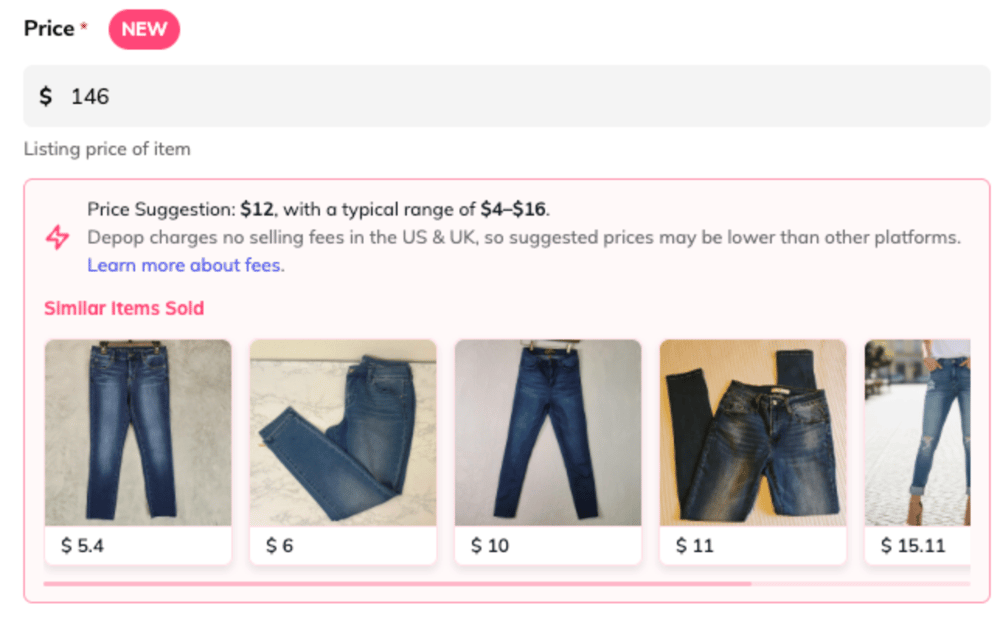
This is the part we're most excited about. When you list an item on Depop through Vendoo, the price field now shows you a suggested price and a typical price range. Based on what similar items have actually sold for on Depop, not just what other sellers are asking.
The suggestion is calculated specifically for your item using details like its description, condition, category, size, brand, and location. You'll even see a carousel of similar sold items so you can sanity-check the number yourself.
No more second-guessing. Price too low and you lose margin; price too high and your item sits. Price Suggestions helps you find the sweet spot faster, and price with confidence instead of guessing.
Price Suggestions appears right in the Depop listing form whenever your Depop account is connected.
What You Need to Do: Reconnect Your Depop Account
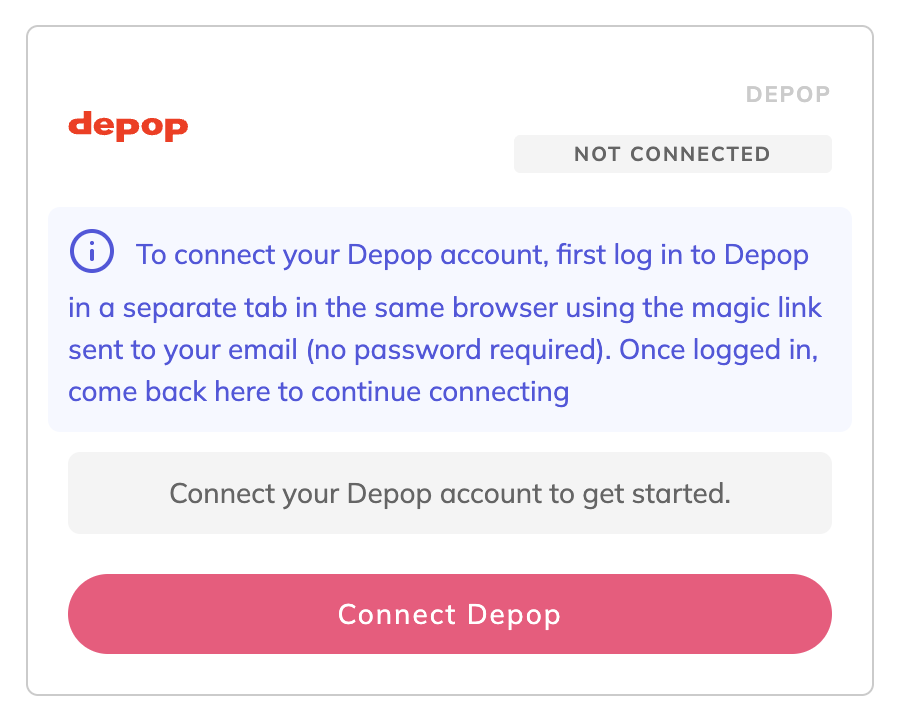
To activate the new integration, you'll need to reconnect your Depop account inside Vendoo. A one-time step that takes less than 2 minutes.
When the new integration reaches your account, your Depop connection will appear as "Not Connected." That's expected – it's not a bug, and none of your listings or inventory are affected. It simply means you're ready to switch over. Here's how:
- Go to Settings → Marketplace Connections in Vendoo.
- In a separate tab of the same browser, log in to Depop using the magic link sent to your email (no password required).
- Come back to Vendoo and click Connect Depop.
That's it. One step unlocks everything above. The legacy connection method is being retired, so reconnecting is what keeps your listing, syncing, and Sale Detection running without interruption.
Frequently Asked Questions
Why does my Depop connection show as disconnected?
The new integration uses a new, more secure connection method, so your previous connection can't carry over automatically. Reconnecting takes about 2 minutes and everything picks up right where you left off.
Can I turn Sale Detection off?
No. With the new integration, Sale Detection is always on. It runs in real time and keeps your inventory accurate automatically.
Where did the sync button go?
Syncing now happens automatically every 30 minutes, so a manual sync button is no longer needed. The "Last sync" label on the Import page shows when your items were last updated.
Do I still need the Vendoo browser extension?
Not for Depop. Every Depop feature now works without it. If you sell on other marketplaces that use the extension, keep it installed for those.
What happens if I don't reconnect?
Your Depop features in Vendoo will stay paused until you reconnect. Since the legacy connection is being retired, reconnecting is required to keep listing, syncing, and detecting sales on Depop.
Reconnect Now and You're Set
We work every day to make Vendoo better for you, and this is one of the biggest upgrades we've made to a marketplace connection yet: a stronger foundation, more automation, and a smarter way to price.
Questions? Our support team is ready to help.