

Snap a picture on your phone to instantly see how much something is worth with tools like Google Lens, Amazon Camera Search, eBay Visual Search, ChatGPT, Worthwise, WhatsitAI, Revalue, and ThriftAI. These photo-to-value apps use visual recognition and marketplace data to identify items and estimate prices in seconds.
This guide explains how the technology works, which apps are best for resellers, and how to turn estimates into real sales with a practical workflow.
How Photo-to-Value Tools Work
These apps instantly identify items and estimate value from a single image, combining AI recognition with real-world market data research.

Here’s a deeper look at how they work 🤖
- Visual Recognition and AI Image Classification
Apps analyze the photo using computer vision models trained on millions of product images to identify shapes, colors, logos, materials, text, and patterns, then match the item to known categories. - Price Estimates From Marketplace Data
Once identified, the tool compares the item against active listings, recent sold history, and pricing trends pulled from marketplaces like eBay, Poshmark, Amazon, StockX, and niche resale platforms, typically returning a value range rather than a fixed price. - Condition Detection Basics
Some tools attempt limited condition analysis by detecting visible wear such as scuffs, fading, creases, or packaging condition, but this remains a surface-level assessment. - Accuracy Caveats and Condition Impact
Results are most accurate for branded, mass-produced items with strong sales history. Unique antiques, altered items, heavy wear, or poor-quality photos reduce reliability, making manual verification with sold comps essential.
👀 Did you know that using white backgrounds on your listing photos can help your items appear in more searches, because it clearly signals to AI systems what the subject is and what the background is?
Apps to Take a Picture and See How Much Something is Worth
Below are the most reliable photo-based valuation apps for resellers in 2026, each offering a different approach to identifying items and estimating market value from an image. No single tool is perfect, but using several together creates a more accurate pricing picture.
|
App |
Best For |
Platform |
Pricing |
|
Google Lens |
General identification |
Web, iOS, Android |
Free |
|
Amazon Camera Search |
Retail products |
iOS, Android |
Free |
|
eBay Visual Search |
Market value on eBay |
iOS, Android |
Free |
|
Worthwise |
General resale value |
iOS |
Freemium |
|
WhatsitAI |
Thrift sourcing |
Android |
Freemium |
|
ChatGPT |
Contextual valuation and research |
Web, iOS, Android |
Freemium |
|
Revalue |
Clothing resale |
Web |
Subscription |
|
ThriftAI |
Thrift profit analysis |
iOS |
Freemium |
Here’s a deeper look at each app and how it works:
Google Lens

- What it does: Identifies items from photos and surfaces visually similar products with pricing context from across the web.
- Features: logo and text recognition, product matching, web, and shopping results.
- Pros: extremely fast, free version is sufficient, excellent for item identification, and the ability to add text to the search, or ask questions via integrated Gemini AI.
- Cons: not a true valuation tool
- Best use case: Identifying unknown items before pricing
- Platform: Web, iOS, Android
- What it uses: Google computer vision and indexed web data
- Pricing: The Free plan is adequate for this purpose, but paid plans offer additional features.
- Limitations to consider: Prices shown are current market references, not sold comps
You might also be interested in the article What is Google Lens and How to Use It
Amazon Camera Search “Amazon Lens”

Photo Source: Amazon
- What it does: Matches photos to Amazon catalog listings to display current retail pricing for the exact or closest product match.
- Features: SKU-level image matching, variant comparisons by size or color, direct product links.
- Pros: Very accurate for modern retail items, and fast results.
- Cons: Displays Amazon retail prices only, not resale or second-hand values.
- Best use case: Pricing new or like-new electronics, home goods, and retail products.
- Platform: iOS, Android
- What it uses: Amazon’s internal product catalog and image matching technology.
- Pricing: Free as part of the Amazon app.
- Limitations to consider: Does not account for condition, resale demand, or secondary market pricing.
eBay Visual Search

Image Source: eBay
- What it does: Uses a photo to find visually similar listings on eBay, including active and sold items.
- Features: Image-based search, sold listing filters, category-based refinement.
- Pros: Direct access to resale comps, strong accuracy for common resale categories, free to use.
- Cons: Requires manual filtering and interpretation of results.
- Best use case: While it was actually designed for shoppers to find items, it helps sellers pricing items for resale using real market data.
- Platform: iOS, Android
- What it uses: eBay marketplace data combined with visual search algorithms.
- Pricing: Free for eBay users.
- Limitations to consider: Results depend heavily on photo quality and correct category matching.
💡Tip: For more market value information, try the eBay Product Research tool.
ChatGPT
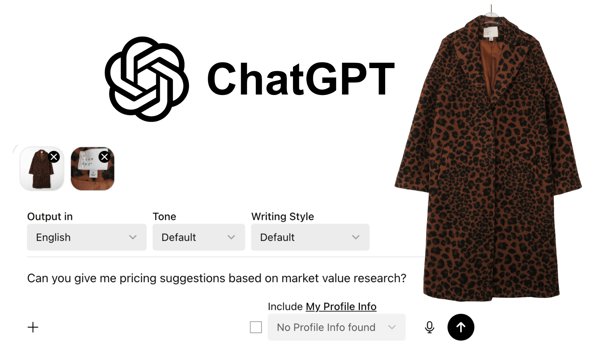
- What it does: Analyzes photos alongside user-provided context to help identify items, explain what they are, and guide value research based on resale behavior and market logic.
- Features: Image analysis, contextual reasoning, category and era identification, pricing explanation.
- Pros: Excellent for unusual, vintage, or hard-to-identify items, strong explanatory depth, flexible follow-up questions.
- Cons: Does not pull live marketplace sold data automatically.
- Best use case: Identifying what an item is and learning how to research its value properly.
- Platform: Web, iOS, Android
- What it uses: Multimodal AI reasoning trained on broad market and product knowledge.
- Pricing: Free plan available, paid plans offer advanced capabilities.
- Limitations to consider: Estimates must be verified manually using marketplace sold listings.
Worthwise

Image Source: Worthwise App Store
- What it does: Uses AI to estimate resale value ranges from a photo by analyzing marketplace pricing signals.
- Features: Photo-based valuation, multi-market pricing ranges, fast results.
- Pros: Designed for resellers, quick decision-making support, and simple interface.
- Cons: Limited transparency into exact data sources.
- Best use case: Getting a fast resale value estimate while sourcing.
- Platform: iOS
- What it uses: Proprietary AI models trained on resale marketplace data.
- Pricing: Freemium with optional paid upgrades.
- Limitations to consider: Value ranges should always be confirmed with sold comps.
WhatsitAI

- What it does: Identifies items from photos and suggests resale value ranges, with a focus on thrifted and secondhand goods.
- Features: Broad category recognition, simple image upload, fast identification.
- Pros: Useful while thrifting, quick results, easy to use in-store.
- Cons: Less accurate for rare, niche, or high-end items.
- Best use case: Thrift stores, flea markets, and garage sales.
- Platform: Android
- What it uses: Image recognition combined with resale pricing data.
- Pricing: Freemium.
- Limitations to consider: Pricing ranges can be wide and require verification.
Revalue
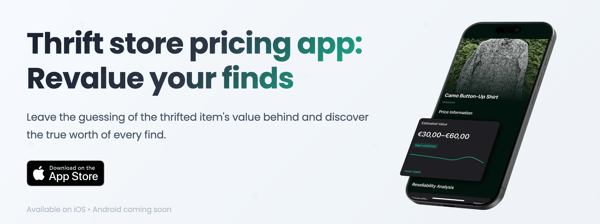
- What it does: Provides resale pricing guidance with a primary focus on clothing and accessories.
- Features: Apparel-focused recognition, resale price estimates, fashion-specific analysis.
- Pros: Useful for clothing resellers, especially vintage and branded apparel.
- Cons: Subscription required for full access. Best suited for UK users and marketplaces.
- Best use case: Pricing clothing and fashion accessories for resale.
- Platform: Web
- What it uses: Fashion recognition models and resale datasets.
- Pricing: Subscription-based.
- Limitations to consider: Limited usefulness outside apparel categories.
ThriftAI

- What it does: Analyzes photos to estimate resale value and potential profit for thrifted items.
- Features: Profit-focused valuation, simple decision support, quick photo analysis.
- Pros: Built specifically for resellers, fast sourcing insights. Very popular among sellers.
- Cons: Accuracy varies by category and item type.
- Best use case: Evaluating thrift store finds for resale potential.
- Platform: iOS
- What it uses: AI valuation models trained on resale comps.
- Pricing: Freemium.
- Limitations to consider: Not a replacement for manual research or sold data verification.
Step-By-Step Guide: How to Use These Tools
Take clear photos in good lighting.
Accurate identification and pricing start with quality images. Use natural light when possible and avoid harsh shadows or yellow indoor lighting. A plain white, gray, or neutral background helps tools isolate the item more accurately. Capture both the front and the label.The more visual data you provide, the better the results.
Upload images to at least two tools to compare information.
No single tool is perfect. Different platforms rely on different databases, algorithms, and data sources. Uploading the same photos to two or more tools allows you to cross-check identification details, suggested categories, and price ranges. If one tool fails to identify the item correctly, another may succeed or provide useful clues.
Compare identification results and value ranges.
Look for consistency in brand, model, age, or category across results. Pricing estimates should be treated as rough ranges, not final answers. Prioritize results that reference recent data, as market demand and resale values shift quickly. Outdated listings or historical pricing can significantly misrepresent an item’s current value.
Verify prices using sold listings on marketplaces.
Always confirm tool-generated estimates by checking sold listings on platforms like eBay, Poshmark, Mercari, or Etsy. Sold data reflects what buyers are actually paying, not what sellers hope to get. Filter by “sold” or “completed” listings and compare items that closely match yours in condition, size, and style.
Adjust pricing for condition, rarity, and platform fees.
Final pricing should account for real-world factors. Items with flaws, wear, or missing components should be priced lower than pristine examples. Conversely, rare, discontinued, or highly sought-after items may justify a higher price. Don’t forget to factor in marketplace fees, shipping costs, and your desired profit margin before settling on a final listing price.
Advanced Tips for Accurate Estimates
Getting a reliable value estimate from apps to take a picture to see how much something is worth requires more than uploading a single image and accepting the first number you see. Experienced resellers use a combination of technique, verification, and judgment to tighten pricing accuracy.

Sometimes, there is such a wide range of comps that you are left wondering where to price.
Here are some tips to help you estimate pricing range:
- Grade condition conservatively and consistently: Always assume the lowest reasonable condition category unless the item is truly flawless. Minor flaws such as light pilling, faint scratches, stretched fabric, missing accessories, or cosmetic wear can significantly affect resale value.
- Use multiple tools before pricing: No single app has complete market visibility. One tool may identify the item accurately, while another provides better pricing context. Cross-checking results helps reveal pricing overlap and filters out outliers caused by poor matches or limited datasets. If you’re selling on a particular marketplace, the comps on that specific marketplace are generally the most influential.
- Focus on active data rather than sold prices: Active listings reflect your current competition rather than what’s not even available anymore. Always prioritize sold listings when verifying value but active listings when determining pricing. This is especially important in fluctuating markets such as fashion, electronics, and collectibles.
- Seek professional appraisal for high-value items: If an item appears rare, historically significant, or potentially worth four figures or more, AI estimates should only be a starting point. Professional appraisers can evaluate authenticity, provenance, materials, and condition factors that photo tools cannot reliably assess.
Case Studies and Examples
Pricing Clothing Example
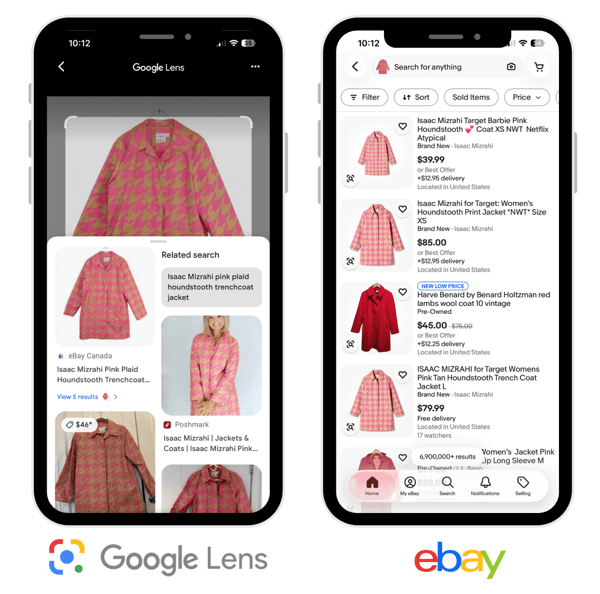
Here, I first searched by image with Google Lens to learn what the item was and get a quick look at retail and resale values. Then, I used eBay Visual Search to review active listings. Here, I can filter by size, and condition, and also view sold comps. The final price lands within the middle of the sold range, resulting in a faster sale.
Pricing Vintage Decor Example
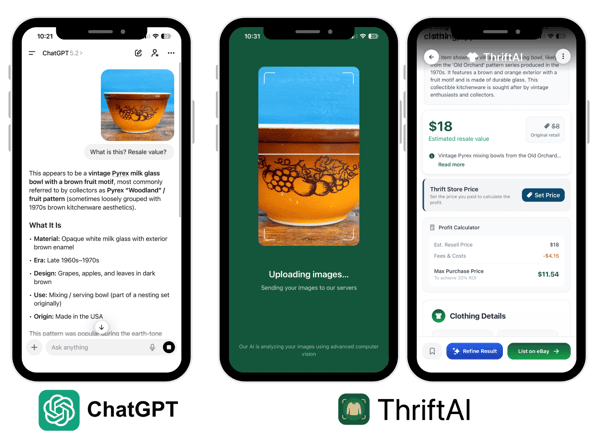
Here, for example, I used ChatGPT to analyze and identify this vintage dish. ChatGPT provided the brand, style, and era. Then, I used ThriftAI for pricing guidance.
Electronics Pricing Example
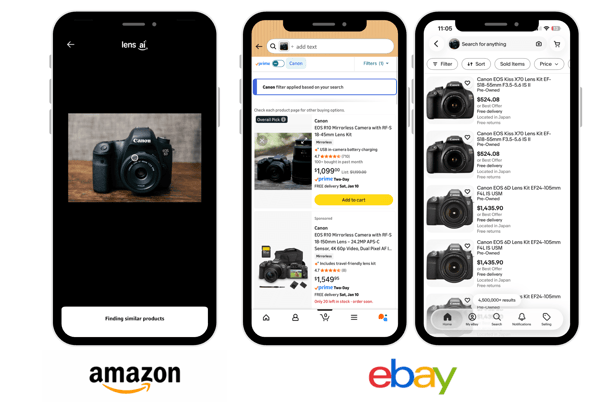
Here, to determine pricing for this camera, I used Amazon Camera Search to identify the exact model and take a peek at retail pricing. Thereafter, I used eBay Image search to browse active listings and sold listings to better gague appropriate resale pricing.
How Photo Valuation Tools Fit Into a Vendoo Reselling Workflow
Photo valuation tools answer the first question every reseller asks: what might this item be worth. The next step is execution.
Once an estimated value is confirmed using sold data, sellers can move directly into listing creation and distribution using Vendoo. Vendoo allows sellers to create optimized listings, crosslist to multiple marketplaces, manage inventory in one place, automate sharing and offers, and track performance across platforms.
This transforms valuation insights into real sales by connecting pricing research with listing efficiency and marketplace reach.
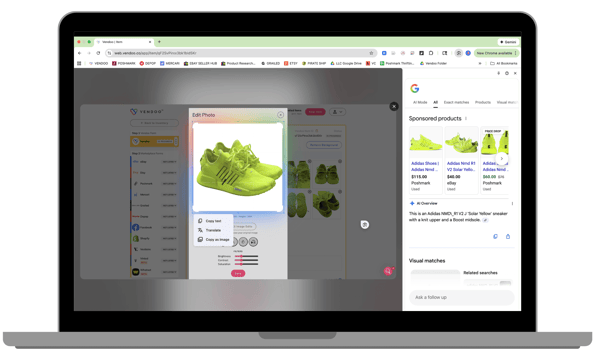
💡Tip: Use Google Lens right in Vendoo on the desktop version by right-clicking a photo and seleting “Search"
Making Smarter Pricing Decisions With Photo AI Tools
Photo-based valuation apps have changed how quickly sellers can identify items and estimate market value, especially when sourcing in fast-moving environments like thrift stores, estate sales, and online arbitrage.
While no app can determine an exact price from a single image, using visual search and AI tools together provides a powerful starting point for smarter pricing decisions.
The most reliable results come from combining photo identification, verification with recent sold data, and thoughtful condition adjustments. When these insights are paired with a resale execution platform, sellers can move seamlessly from valuation to listing and distribution.
Used correctly, photo-to-value apps help resellers reduce guesswork, price competitively, and turn research into consistent sales.
Do you have any tips for using AI for pricing research? Tell us below 👇🏽
AI Photographs and Pricing FAQ
Can I take a picture of something and find out what it is worth?
Yes, you can take a picture of an item and use photo-based AI tools to identify it and estimate its market value. These apps analyze visual details and compare them to existing marketplace data.
How do I check the price of something using a photo?
Start by taking a clear, well-lit photo of the item, then upload it to one or more photo valuation or visual search tools.
Is there an app that tells you what something is worth?
Yes. Apple like Google Lens, Amazon Camera Search, eBay Visual Search, ChatGPT, Worthwise, WhatsitAI, Revalue, and ThriftAI identify items and help with pricing research.
Can Google Lens value items accurately?
Google Lens is excellent for identifying items and showing current market references, but it does not provide true resale valuations. While it will yield some comparables, pricing requires cross-checking against sold data on resale marketplaces.