

Have you ever wondered what the reference to a product you saw on the street is called? Google Lens is your pocket-sized expert, ready to unlock the world around you with one tap. It’s a revolutionary AI-powered recognition tool that transforms how we interact with the world around us. You might be wondering:
What is Google Lens, and How to Use It?
Google Lens is one of the world’s most powerful image recognition tools. It's a reverse image searching tool that allows you to search Google by a photo. By pointing your camera at an object or uploading an image, the tool can run a visual search and fetch detailed information, actionable options, or translations within seconds. Compatible with Android and Apple iOS, and seamlessly integrated into various Google services, it is an excellent tool. In this guide, we will explore Google Lens, its features, applications, and how to use it.
Key Takeaways:
- Google Lens simplifies tasks by helping users identify objects, translate text, and discover information quickly, saving time and boosting productivity.
- You can use the app on Android phones, iPhones, Google Photos, and Google Search, offering flexibility wherever you go.
- Users can manage permissions and adjust settings to control how their data is used when interacting with Google Lens.
- When combined with tools like Vendoo, Google Lens can streamline inventory management, product research, and listing tasks, offering resellers a competitive edge in the market.
What is Google Lens?
Google Lens is an AI-powered visual recognition tool. It’s built to analyze images and provide useful insights or actions based on those findings. It acts as your very own personal assistant by identifying objects, translating text, or even finding similar products online. Here’s a snapshot of its key features:
- Image Recognition: It can effortlessly identify objects, landmarks, and even specific text in images. For example, you can snap a picture of an item with no label, and it will pull up the brand name.
- Text Translation: Translate menus, signs, or documents in real time by pointing your camera at the text. This feature supports dozens of languages and works even in offline modes with pre-downloaded packs.
- Product Search: Point the camera towards an item and simply take a photo. Google Lens will find similar products or provide purchasing options. This is especially handy for finding outfits, furniture, or gadgets.
- Integration: It is integrated with Google Photos, Google Search, and the Google app, providing seamless functionality across platforms.
How Does Google Lens Work?
Google Lens makes use of advanced AI and machine learning algorithms to process visual information.
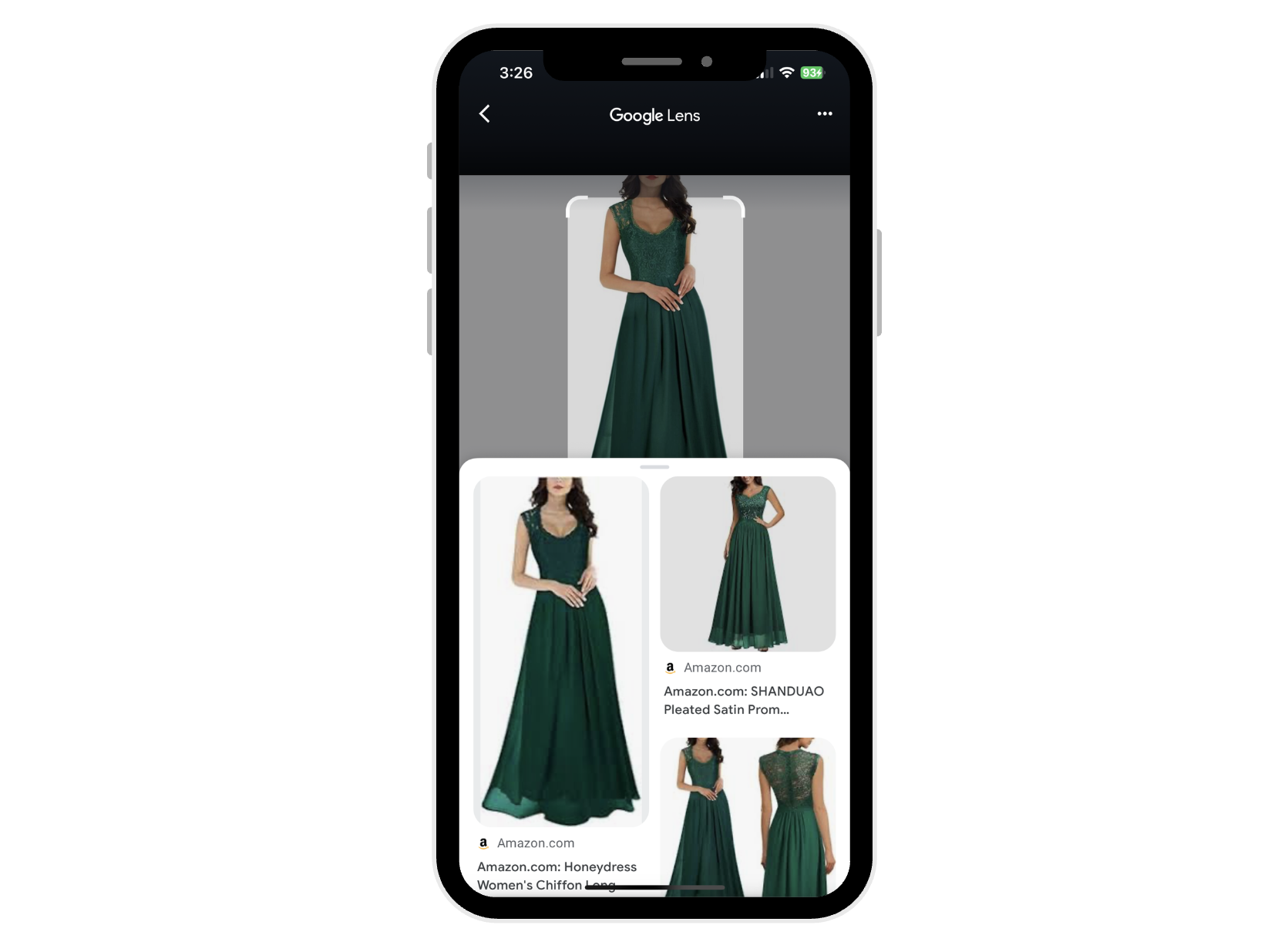
Here’s a step-by-step breakdown of how it works:
- Capture: Open the Google Photos app and point your camera at an object. You can also select an existing image from your camera roll.
- Analyze: Using cloud-based AI, Google Lens analyzes the image, identifying key elements such as text, objects, or context.
- Deliver Results: Based on what it finds, the app offers actionable insights such as identification, translations, shopping links, or relevant details like brand or pricing.
Features and Use Cases
Google Lens has developed some advanced visual search features that can easily help you:
- Extract Text: Highlight and copy text directly from images, making it easy to digitize handwritten notes or printed documents.
- Translate in Real-Time: Translate foreign languages instantly by pointing your camera at the text. This is ideal for travelers navigating menus, signs, or documents in a foreign language.
- Identify Products: Snap a photo of an item, and the app will find identical or similar products online.
- Compare Prices: Quickly access price comparisons from multiple online retailers to get the best deal.
- Note-taking: Extract and save text from books or presentations for later use.
- Object Identification: Use Google Lens as a learning tool to recognize plants, animals, or historical artifacts.
- Recognize Landmarks: Point your camera at landmarks to get details such as historical facts, nearby attractions, and visitor reviews.
- Read Menus: Scan foreign menus to translate or get dish recommendations based on popularity.
- Scan QR Codes: Quickly decode QR codes for links, information, or payment details.
- Organize Notes: Save and categorize information from scanned images for better organization.

How to Use Google Lens for Maximum Productivity
Google Lens recently got rolled out across a variety of devices and operating systems. It comes with many features that can help you further boost your productivity. Here’s how to use it.
On Android Devices:
Google Lens is integrated into most Android devices, making it easy to access through Google Assistant or the standalone app. Here’s how you can use it:
- Open Google Assistant by holding the home button, or simply saying "Hey Google."
- Tap the Lens icon or simply say "Use Google Lens."
- Alternatively, you can also download the Google Photos app from the Play Store for more dedicated features.
On iPhones:
To use Google Lens on your iPhone, you’ll need to download the standalone Google Photos app from the App Store. Here’s how:
- Go to the App Store and search for “Google Lens.”
- Download and open the app.
- Allow access to your camera and start scanning objects or text for quick insights.
In Google Photos:
Google Lens can also be used directly in Google Photos to analyze images you've already saved. Here’s how:
- Open the Google Photos app and select the photo you want to analyze.
- Tap the Lens icon at the bottom of the screen.
- Google Lens will automatically scan the image for objects, text, or locations, offering useful information and links.
Via Google Search:
You can also access Google Lens through the Google app or Chrome browser on both Android and iOS devices. Here are the steps:
- Open the Google app or Chrome browser.
- Tap on the Lens icon in the search bar (it may also appear in the camera section for some users).
- Use Lens to search for products, identify objects, or translate text directly from the browser.
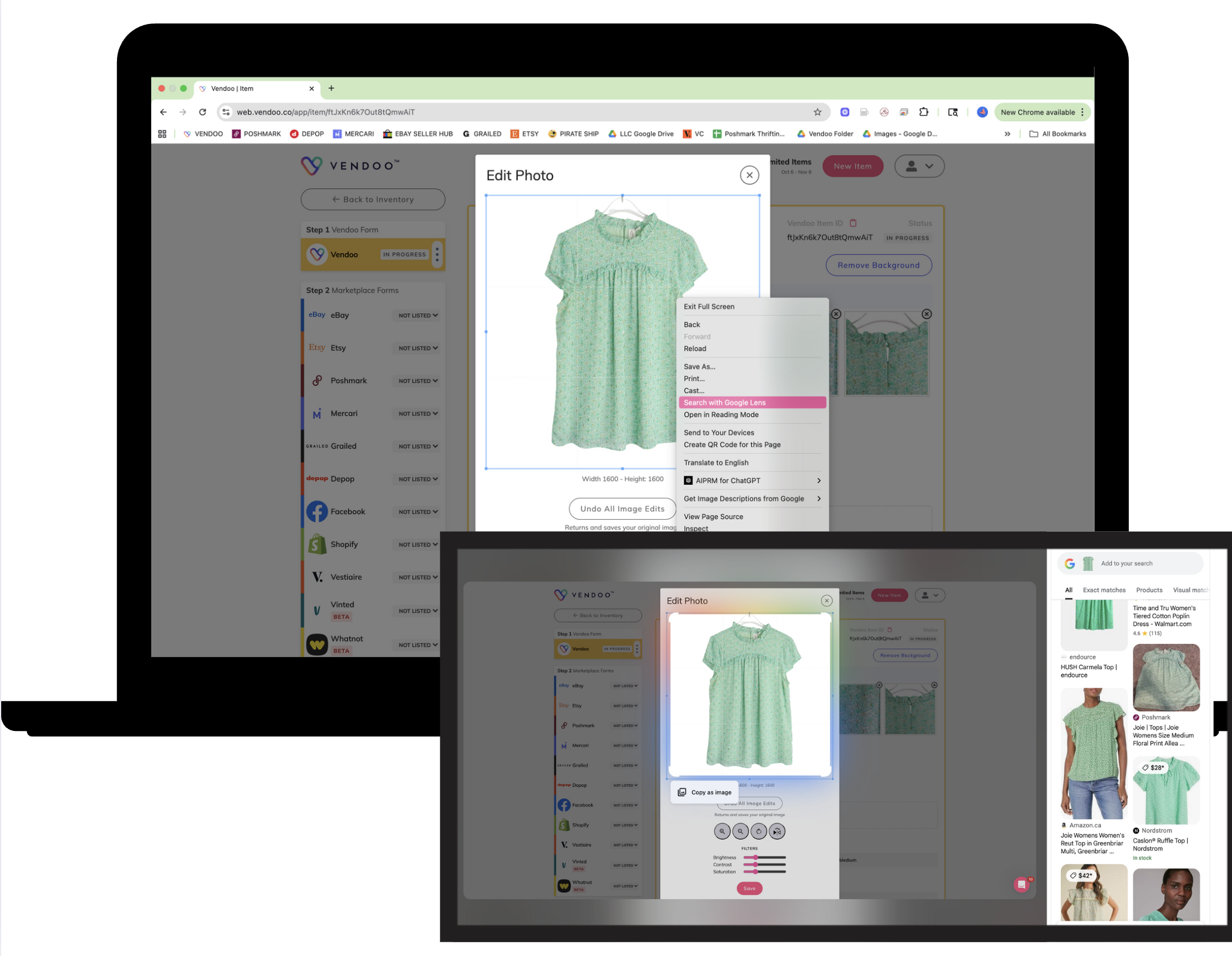
On the Google Chrome web browser, you can right-click an image on any website and select "Search Image with Google Lens" to access the tool.
Benefits of Google Lens for Users
Thanks to its AI-powered recognition features, Google Lens boasts a host of features that make it a favorite among users worldwide. Here’s a breakdown to help you get an idea of the benefits the tool brings.
- Time-Saving: Google Lens can streamline everyday tasks, saving users time. It eliminates the need for manual searches and simplifies the process, allowing users to complete tasks with a single snap.
- Enhanced Learning: Convenience aside, Lens is also great for supercharging your learning. Google takes learning seriously and keeps coming up with dedicated solutions to make learning fun and easy. Similar to Google’s dedicated learning app, Socratic, Google Lens can also help users discover more about the world around them. Be it learning about historical landmarks or identifying plants, animals, and artworks, the tool can help. This enriches the user’s knowledge by providing immediate access to detailed information and explanations.
- Improved Accessibility: Google Lens works seamlessly across both Android and iOS, making it widely accessible to a variety of users. It integrates smoothly with other Google services like Assistant and Photos, enhancing its utility. For those with visual impairments, Google Lens can even describe surroundings, read signs aloud, and identify products, contributing to a more inclusive digital experience.
- Convenience: Convenience is one of the reasons why people turn to Google Lens. By simply pointing your phone’s camera at an object, you can get detailed information without lifting a finger. It takes away the hassle of typing search queries and allows users to get real-time answers, making it ideal for people who prefer quick and snappy solutions.
Google Lens Privacy Concerns
While Google Lens offers a host of valuable features, it does raise some privacy concerns. These mainly stem from the nature of the data it processes. Google collects images and data from users’ devices to improve its services, but you can take some steps to protect their privacy while using the tool.
Here are a few major privacy concerns and how you can manage them:
- Managing Permissions: One of the most effective ways to maintain privacy is by managing the permissions granted to the Google Lens app. Users can control which features the app can access, such as the camera, gallery, and microphone. Limiting permissions ensures that the app only collects the necessary data, reducing the risk of unwanted surveillance.
- Adjusting Settings: Google provides users with the option to adjust privacy settings within their Google account. This includes opting out of personalized ads and controlling how data is shared across various Google services. Regularly reviewing and updating these settings ensures that you have control over the information Google collects and how it is used.
- Data Usage Transparency: In today’s world, data privacy is a major concern, and rightfully so. Everyone deserves to know where their info is being stored and how it’s being used. Understanding how Google stores and uses your data is really important. Thankfully, Google explicitly outlines its privacy policies and data usage. By catching up with these policies, users can fully understand what data is collected and how it’s used, including whether it’s shared with third parties or used for product improvement.
Tips for Getting the Most Out of Google Lens
Lens is a feature-packed tool that can help you simplify daily tasks, and there are some more things you can do to enhance the experience even further. Here are some things to take Google Lens adventures to the next level:
- High-Quality Images: Try to take photos that are well-lit and focused. These can help achieve the most accurate results. Clear and sharp photos help Lens identify objects more efficiently.
- Use Filters: Refine your searches by applying filters like "Text" or "Shopping" to narrow down results and get more specific information.
- Integrate with Google Tools: Crank up your productivity by using Google Lens alongside Google Photos, Drive, and Search. This integration is a lifesaver for many! It offers enhanced features like saving identified objects to your library or quickly searching for related content.
Tips for Resellers:
Google Lens is one of the most valuable tools for resellers. It helps quickly identify items, find comparable listings, uncover strong keywords, determine retail pricing, and verify product details. Using it strategically can save significant time and increase listing accuracy.
- Use Google Lens to search visually similar items and identify exact or comparable brands, styles, patterns, titles, and product names.
- Scan labels, logos, or signature design elements to discover brand information and specific product models.
- Capture barcodes or manufacturer tags to view retail prices, product history, and discontinued styles.
- Review shopping and secondhand listings generated by Lens to estimate fair and profitable pricing.
- Note common title phrases and descriptors on matching results to build high-performing keywords.
💡Tip: On Google Chrome web browser, you can right-click your product image on a marketplace or in your Vendoo inventory and select "Search Image with Google" to use the Lens tool.
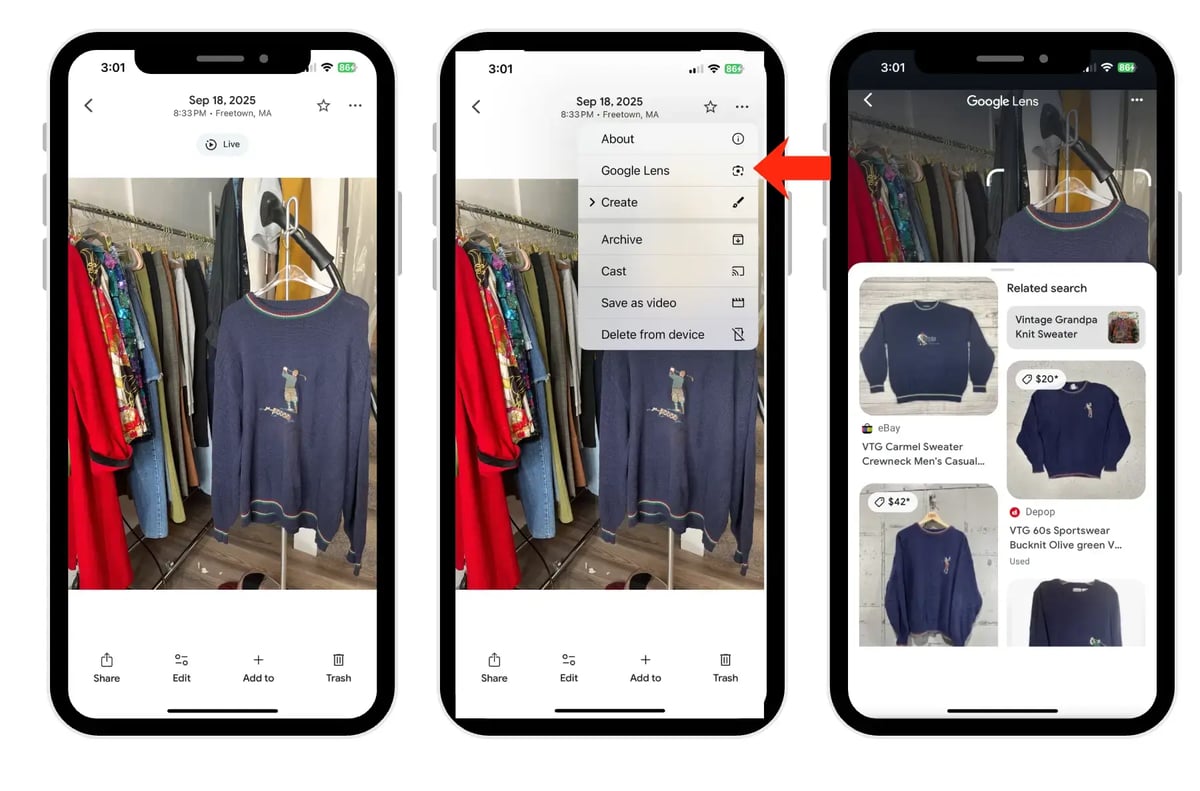
Here is an example of using Google Lens to research an item. I opened the Google Photos app, uploaded a picture of this sweater, and searched by the photo. It yielded exact matches listed on various marketplaces.
Limitations of Google Lens
While Google Lens is a handy tool, it certainly isn’t a one-size-fits-all solution. Like everything else, it also comes with some limitations. Here are a few problems you might run into:
- Inaccuracy: While the app has an advanced OCR engine, it can still make mistakes. Results may sometimes be inaccurate due to image quality or ambiguous inputs. Since Google relies on machine learning, it can misinterpret unclear or low-quality images.
- Internet Dependency: Most Google Lens features require an active internet connection to work. Without internet access, certain features, such as real-time object recognition or translation, may be unavailable.
- Language Barriers: Some translation and feature capabilities may be restricted in certain regions, reducing the tool's effectiveness for users in those areas.
What the Future Holds for Google Lens
Google Lens is changing the world, and it’s here to stay! As it continues to evolve thanks to advancements in AI and machine learning, several developments are expected. And the best part? These new updates will continue to shape its future capabilities.
Here are a few things you can expect to see in the future:
- Expanded Language Support: Google is continuously upgrading its language support. Google developers aim to include more regional languages and dialects. As of now, Google Lens supports over 100 languages, and we can expect even broader coverage in the future, allowing users worldwide to access its features.
- Increased Accuracy: It is expected to benefit from more advanced AI algorithms, improving its accuracy in object recognition and contextual understanding. With continuous improvements in computer vision, we can expect even more precise results for both common and complex queries.
- Innovative Features: The future of Google Lens will likely see the introduction of new tools and integrations, including enhanced augmented reality (AR) capabilities. These could allow for more interactive and immersive experiences, such as providing detailed overlays for objects or landmarks and expanding its role in both daily tasks and business applications.
Revolutionize Reselling with Vendoo and Google Lens
For resellers, combining Google Lens and Vendoo can be a total game-changer. Whether you’re looking for new inventory, verifying product details, or researching the market, Google Lens will instantly pull up what you need. Pair it with Vendoo’s inventory management and multi-marketplace listing tools, and voila! A powerful solution that makes running your reselling business a breeze!
By exploring Google Lens and integrating it with Vendoo, you can streamline your workflow, make smarter decisions, and ultimately boost your sales. So why not give it a try? With these tools, you'll have everything you need to stay ahead in the reselling game.
FAQs
What devices support Google Lens?
Google Lens is available on most Android smartphones and tablets with the Google Photo app. It is integrated into the Google Assistant. It also works on iOS devices through the Google Photos and Google Search apps. As long as your device has a camera and is running the latest version of the necessary apps, you can use Google Lens.
Is Google Lens free to use?
Yes, it is completely free to use. There are no subscription fees or hidden charges associated with its core features. Users can access all basic functions like object recognition, translation, and shopping without having to pay a cent.
How secure is my data when using Google Lens?
Google takes privacy seriously, and data shared with Google Lens is subject to its privacy policies. While Google collects some data to improve its services, you have control over your data through privacy settings in your Google account. It’s wise to regularly review these settings to ensure you're comfortable with the data being collected.
Can Google Lens work offline?
No, it has limited offline functionality. While some basic features like text recognition and saving information to Google Photos can work offline, many advanced features like real-time translation, product identification, and web-based searches need an internet connection to work.