

Facebook Marketplace Delete and Relist is a strategy where a seller completely removes an unsold item and creates a brand-new listing for it so the algorithm treats it as fresh inventory. Because new listings tend to receive stronger initial visibility, manually relisting, or using a tool like Vendoo, can push "zombie" listings — even ones for the top selling items on Facebook Marketplace — back into local search results and buyer feeds when ordinary renewing is no longer producing meaningful engagement.
Main Takeaways
- Delete and relist creates a fresh listing: It gives the item a new Listing ID and URL, helping it re-enter Marketplace as fresh inventory.
- Renewing provides a smaller boost: The Renew button preserves views and saves but typically offers less visibility than a new listing.
- Protect listings with strong engagement: If an item has many saves, try a price drop before deleting and losing that buyer interest.
- Manual relisting is the reliable fallback: Facebook's built-in relisting options can be inconsistent, so sellers should know how to recreate listings manually.
- Relist strategically: Space out relisting activity to avoid looking like spam or triggering Marketplace restrictions.
- Inventory tools save time: Platforms like Vendoo store listing data so sellers can recreate stale listings without starting over.
Renew vs. Delete and Relist: The Algorithm Explained
Facebook Marketplace sellers often use "renew" and "relist" interchangeably, but they are not the same thing.
Renewing is like refreshing, providing a boost of exposure in the newsfeed and search results. Relisting is deleting and creating a brand new listing, which receives the most exposure and visibility.
The distinction matters because each tactic does something different to the existing listing and its engagement history:
The "Renew" Button: Facebook may make the Renew option available once a listing is seven days old and allow sellers to use it up to five times. Renewing keeps the original listing intact, including its views and saves, while giving it a little “boost” in the newsfeed as another opportunity for visibility. The little boost provides less exposure than that associated with a completely new listing. To be clear, it is a renewed listing, not a brand new one.
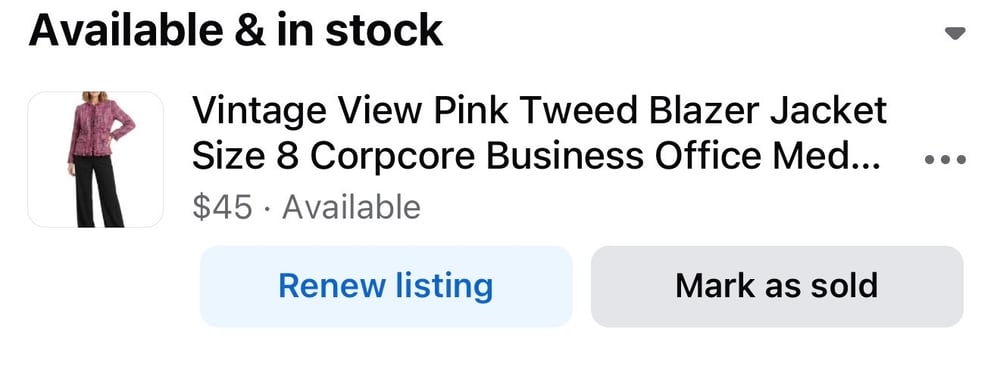
The Delete and Relist Strategy: A true delete and relist removes the existing Marketplace listing and creates another, brand new one. The new post receives a new Listing ID and URL, essentially resetting its age. New listings receive the most exposure in search results and newsfeeds.
This is why relisting can revive an item that appears completely dead. The merchandise did not change. Its position within Marketplace did.
The Trade-off: There is one major downside. Deleting the listing also eliminates the engagement attached to it, including views and saves. If an item has 50 or more saves, consider reducing the price before deleting it. A price reduction may notify interested shoppers and convert some of those watchers into buyers. Once the listing is deleted, those saves are gone.
How to Execute the Delete and Relist Strategy (2026 Methods)
There are several ways to relist on Facebook Marketplace, but sellers should understand all of them because Facebook's interface is not always consistent.
The Automatic Button (Unreliable)
Facebook sometimes provides a built-in Relist or Renew option after an item has remained unsold for a period of time. Some sellers see it after approximately 14 days, while availability can vary. The feature copies the existing listing information while replacing the old post with a new one.
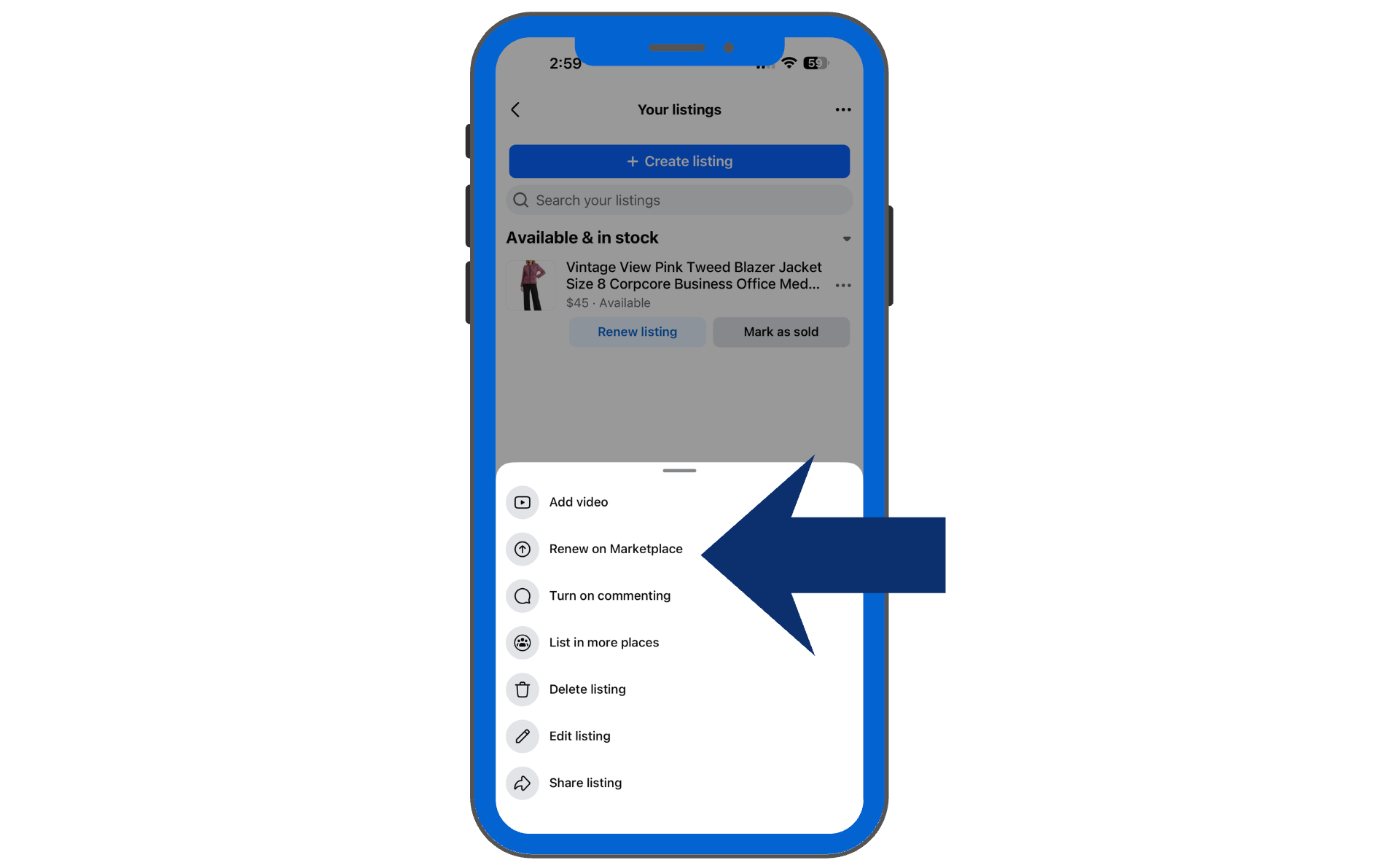
A renew is a nice way to boost exposure before your item is ready to relist, but it is inferior to relisting for engagement and visibility.
Also, sellers cannot depend on the button being there. Facebook routinely changes Marketplace features and interfaces. Reports of disappearing renew options have continued into 2026, making an external inventory record especially useful.
The Manual Method (The Gold Standard)
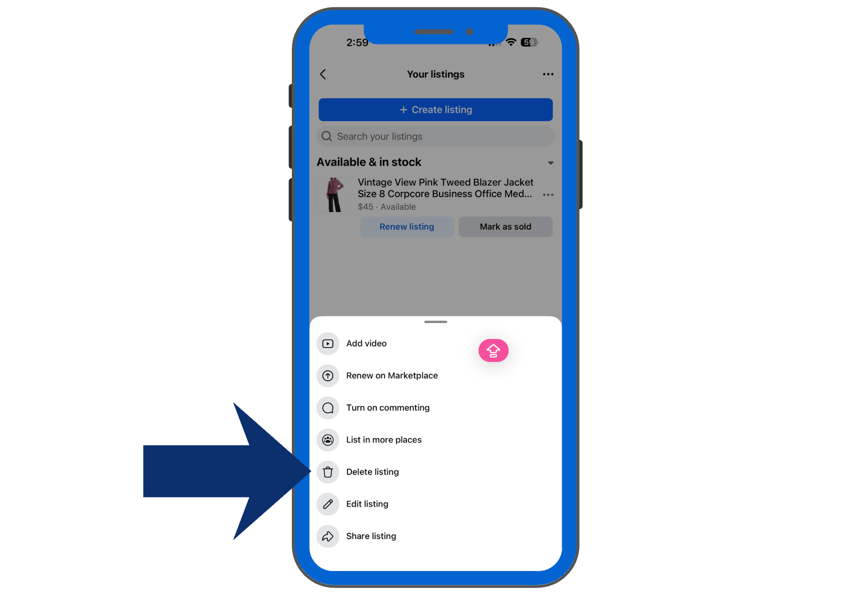
Manual relisting gives sellers the most control. This involves deleting the listing and then posting it again as if it is the first time. Before deleting the existing listing, copy the title, description, price, category information, and other important details into a separate document. Make sure the original photos are saved as well.
💡Tip: When saving photos, do not screenshot. Screenshots reduce the image resolution and quality. Download, save, and title each photograph. Many sellers keep their photos in a Dropbox to assist with this process.
Next, completely delete the existing Facebook Marketplace listing. Confirm that it is gone before proceeding. Then, create a new Marketplace listing, upload the photos, paste in the saved information, verify the listing fields, and publish it.
This takes longer, but it creates an entirely new listing instead of depending on Facebook's internal refresh tools. Brand new listings receive the most exposure and visibility in newsfeeds and search results.
Using Automation: The Best Way to Relist to Facebook Marketplace
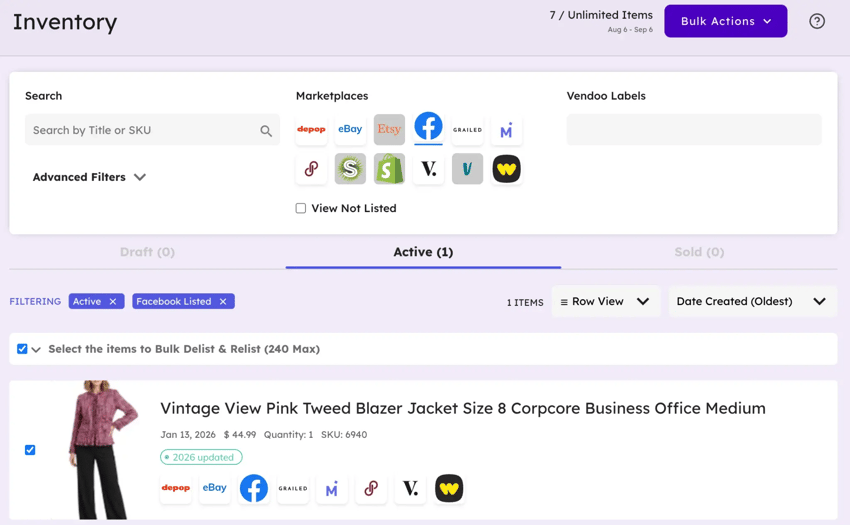
The repetitive work has created demand for third-party relisting tools. For example, Vendoo has a Bulk Delist & Relist Tool specifically designed to delete old listings and recreate brand new ones while retaining information such as the title, description, price, and photos.
Vendoo takes the concept further by keeping the seller's listing information in a centralized inventory system. That means the Facebook listing is no longer the seller's only copy of the product data. No need to save images or copy-and-paste listing information. Vendoo does it all!
Comparison Table: Marketplace Visibility Tactics
Facebook Marketplace requires strategy. Not every stale listing needs to be deleted. The right visibility strategy depends on its age, existing engagement, and how much buyer interest it has already accumulated.
The goal is not to delete everything simply because it did not sell immediately. Look at the listing's existing activity first. A stale item with virtually no engagement is a stronger relisting candidate than an item attracting saves, messages, or active negotiations.
Bulk Delist and Relist from multiple marketplaces at once with Vendoo

The Danger Zone: FBMP Shadowbans and Spam Traps
Delete and relist can increase visibility, but aggressively manipulating listings can also resemble spam and lead to temporary and permanent bans. ⚠️
Facebook does not publish a simple formula telling sellers exactly how many relists will trigger an account restriction, so conservative behavior is important.
The "Duplicate Listing" Error
Always fully delete the old listing before publishing the replacement. If both versions remain active simultaneously, Facebook may identify them as duplicate listings, which can trigger spam detection, severely reduce visibility, and lead to listing bans.
The 10-Item Limit
A useful conservative rule is to avoid deleting and relisting more than ten items during a single session or hour. This is not an official limit, but a way to observe a preponderance of caution. Unusually high listing volume or unusually fast listing activity can trigger temporary Facebook Marketplace restrictions, although there is no published universal number.
💡Tip: Vendoo has built-in security features to reduce speed and mimic human-like activity.
The 30-Day Rule
Do not delete and recreate the same item every 24 hours because it is not selling. You want to allow some time for your listings to index in search results and attract engagement. Allowing roughly thirty days before refreshing stale inventory is a safer approach than daily relisting.
The Vendoo Advantage: Never Lose Your Data
One of the biggest problems with building a resale workflow entirely inside Facebook is that Facebook controls the interface. Buttons change, features disappear, and Marketplace tools can behave differently across accounts.
Vendoo protects against ever-changing UI changes. A master inventory record gives sellers control over their own listing information. With Vendoo, product photos, titles, descriptions, pricing, and other listing details can live in the seller's Vendoo inventory instead of existing exclusively inside Facebook.
Similarly, Vendoo saves sellers time relisting. Instead of copying a description into Notes, hunting through a camera roll for ten product photos, and rebuilding the entire listing, sellers can use the stored Vendoo listing as their master copy. Vendoo's listing system transfers information entered into its primary form into marketplace-specific forms, reducing the amount of repetitive data entry required.
For sellers managing dozens or hundreds of items, those saved minutes add up quickly. Vendoo also offers delist and relist functionality designed to create fresh marketplace listings without requiring sellers to rebuild each product manually.
Facebook Marketplace also does not have to be an item's final opportunity to sell. If a product is sitting locally without meaningful engagement, the same inventory data can be used to crosslist it to other supported marketplaces, including eBay and Mercari. Vendoo supports Facebook Marketplace alongside multiple major resale marketplaces, allowing sellers to manage the same inventory across a broader buyer pool.
Crosslist to 10+ marketplaces in just a few clicks with Vendoo
Is Facebook Marketplace Delete and Relist Worth It in 2026?
The Facebook Marketplace delist and relist strategy is one of the strongest manual overrides available when a good item becomes buried in Marketplace, but it should be used strategically instead of aggressively.
Renew listings that still have traction, protect valuable saves when buyer interest is high, and reserve true relisting for inventory that has genuinely stalled. Instead of holding your breath and hoping Facebook's Renew button suddenly produces results, keep control of your listing data and make stale inventory easier to refresh.
Start a Vendoo free trial to manage Facebook Marketplace inventory securely, crosslist products, and recreate stale listings in seconds.
FBMP Delist and Relist FAQ
What does delete and relist mean on Facebook Marketplace?
Delete and relist means deleting an existing listing and creating a new listing for the same item. The replacement receives a new Listing ID, URL, and listing date. This promotes engagement, exposure, and visibility
Is it better to renew or delete and relist on Facebook Marketplace?
It depends on the listing. Renewing is quick and preserves views and saves, making it useful when an item still has engagement. Delete and relist is more effective because it creates a fresh listing but eliminates existing engagement data. For a truly stagnant listing, relisting generally offers a stronger visibility reset than renewing.
How often should I delete and relist on Facebook Marketplace?
Avoid repeatedly relisting the same product every day. Facebook does not publish a safe relisting schedule, and third-party recommendations vary considerably. A conservative seller strategy is to give listings thirty days to perform and space out relisting activity.
Does deleting a Facebook Marketplace listing remove its saves?
Yes. When you delete the original listing, its existing saves and engagement are gone with it. If a stale item has accumulated significant saves, consider testing a meaningful price reduction before deleting it.
Can I automate Facebook Marketplace delete and relist?
Third-party tools can reduce much of the manual work. Platforms such as Vendoo store listing information and support delisting, relisting, and crosslisting workflows. Automation is especially useful for larger inventories where manually rebuilding every stale listing becomes impractical.