

eBay Promoted Listings: The Complete Guide for Resellers (2026)
If you sell on eBay, you've seen them: listings with a subtle "Sponsored" label sitting at the top of search results. Those are eBay Promoted Listings, eBay's built-in advertising program, and in 2026 they matter more than ever. eBay overhauled how ads are charged and placed in January, and the difference between a well-run campaign and a careless one now shows up directly in your profit.
This guide covers everything resellers need to know: how Promoted Listings work, what General and Priority campaigns actually cost, how to pick an ad rate, and how to manage your promotions, including a new way to do it without leaving Vendoo.
Main Takeaways
- eBay Promoted Listings boost your items' visibility in eBay search results. You choose between two campaign types: General (you pay a percentage of the sale price, only when the item sells) and Priority (you pay per click, with a chance at the #1 spot in search).
- Since January 13, 2026, only Priority ads are eligible for the top search slot, and General ad fees apply when a promoted item sells within 30 days of a click by any buyer.
- The right ad rate depends on your margins and your category. There's no universal number.
- You can now promote your eBay listings directly from Vendoo: add a single item to a General or Priority campaign from its eBay listing form, or head to Marketplace Connections to create campaigns for multiple listings, use advanced Priority targeting, pause or end campaigns, and generate performance reports.
What Are eBay Promoted Listings?
eBay Promoted Listings is eBay's native advertising program. It lets sellers pay to have their items shown more prominently, at or near the top of search results, on product pages, and in other placements across eBay, instead of relying on organic ranking alone.
Unlike running ads on Google or Facebook, Promoted Listings reach buyers who are already on eBay, already searching. That makes them one of the most direct ways to get more eyes on your inventory, especially in crowded categories like clothing, sneakers, electronics, and collectibles.
Promoted Listings work alongside good listing fundamentals, not instead of them. A promoted listing with a weak title, bad photos, or an uncompetitive price is just a more visible weak listing. (If your titles need work first, start with our guide to eBay SEO for listing titles)
How Do eBay Promoted Listings Work?
The mechanics are simple on the surface: you add a listing to a campaign, eBay shows it in sponsored placements, and you pay according to the campaign type, either a percentage of the sale or a cost per click.
Under the hood, two things determine what you actually pay.
Placement. Where your ad appears depends on your campaign type, your ad rate or bid, listing quality, and relevance to the buyer's search. Since January 2026, the #1 sponsored slot in search results is exclusive to Priority campaigns. General ads appear in placements below it.
Attribution. For General (cost-per-sale) campaigns, eBay charges the ad fee when a promoted item sells within 30 days of a click on the ad by any buyer, not just the one who purchased. This changed on January 13, 2026. Previously, eBay distinguished "direct" and "halo" attribution; now any qualifying click within the 30-day window triggers the fee when the item sells. In practice, more sales get counted as ad-attributed than before, which is worth knowing when you review your ad dashboard.
eBay Promoted Listings Campaign Types: General vs. Priority
eBay renamed its campaign types in 2025: what sellers used to call "Promoted Listings Standard" is now General, and "Promoted Listings Advanced" is now Priority. Here's how they compare.
General Campaigns (Cost Per Sale)
General is the lower-risk option and the one most resellers start with. You set an ad rate, a percentage of the item's total sale amount, and you're charged only when the promoted item sells within the 30-day attribution window. No sale, no fee.
Key things to know:
- You choose the ad rate per listing or campaign (for example, 13% of the sale price).
- A listing can belong to one General campaign at a time.
- eBay offers a dynamic ad rate option that adjusts automatically to stay competitive, or you can set a fixed rate you control.
- Since the 2026 update, General ads are no longer eligible for the very top search slot. They show in other sponsored placements.
Priority Campaigns (Cost Per Click)
Priority campaigns work like traditional PPC advertising. You set a daily budget (minimum $3/day) and pay for every valid click, whether or not it leads to a sale.
Key things to know:
- Priority ads are the only ads eligible for the #1 sponsored spot in search results. If no Priority ad competes for a search, that spot goes to an organic result.
- A listing can join multiple Priority campaigns.
- Because you pay per click, Priority is higher-risk: a listing that attracts clicks but doesn't convert burns budget. It rewards competitive prices, strong photos, and proven items.
General vs. Priority at a Glance
|
General |
Priority |
|
|
You pay |
% of the sale price (your ad rate) |
Per click (from your daily budget) |
|
When you pay |
Only when the item sells, within 30 days of any click on the ad |
Every valid click, sale or no sale |
|
Top search slot (#1) |
Not eligible (since Jan 2026) |
Exclusive access |
|
Budget control |
Ad rate %, no spend if no sale |
Daily budget, $3/day minimum |
|
Campaigns per listing |
One General campaign |
Multiple Priority campaigns |
|
Risk level |
Lower (pay on results) |
Higher (pay for traffic) |
|
Best for |
Most resellers, long-tail inventory, testing the waters |
Competitive categories, proven high-converting items |
What About eBay Offsite Ads?
eBay also runs Offsite Ads, which push your listings to external channels like Google. They're a separate program with their own cost model, and for most individual resellers, General and Priority campaigns are where the action is. This guide focuses on those two.
How Much Do eBay Promoted Listings Cost?
The short answer: it costs what you decide it costs. That's the appeal.
- General: your cost is your ad rate, a percentage of the total sale amount, charged only on attributed sales. If you set 10% on a $40 item, you pay $4 when it sells with a qualifying ad click. Set a rate your margin can absorb.
- Priority: your cost is clicks against your daily budget (minimum $3/day). Your real cost per sale depends on your conversion rate. Thirty clicks at $0.25 that produce one sale means that sale cost you $7.50 in ads.
Ad fees come on top of your regular final value fees, so know your full fee picture before setting a rate. Our eBay Fee Calculator handles promoted listing fees alongside every other eBay fee, so you can see your true profit per item before you commit to an ad rate.
What Is "Ad Fee – General" on Your eBay Invoice?
If you've spotted a line item called "Ad fee – General" on your eBay invoice or payout report and wondered what it is, that's the Promoted Listings General fee from an attributed sale: your ad rate applied to an item that sold within 30 days of a click on its ad. It's not a new eBay charge or a mistake; it's the cost-per-sale fee doing what it's designed to do. If the amount surprises you, check the ad rate on that listing's campaign.
How to Set Up eBay Promoted Listings on eBay
The classic route, through eBay itself:
- Go to Seller Hub → Marketing → Advertising dashboard.
- Choose Create campaign and pick General or Priority.
- Select listings, set your ad rate (General) or bids and daily budget (Priority).
- Launch, then monitor performance in the advertising dashboard.
It works, but if you manage inventory across marketplaces, it's one more place to log into, one listing at a time.
New: Promote Your eBay Listings Directly from Vendoo
Here's the part we're excited about. You can now manage eBay Promoted Listings without leaving Vendoo, and there are two ways to do it, depending on how much control you need.
Promote One Item from the eBay Listing Form
Open any eBay listing in Vendoo, and from the listing form you can:
- Create a promotion campaign (campaign names are auto-generated by eBay)
- Set and edit your ad rate (General) or daily budget (Priority)
- Add the listing to a General campaign (cost per sale) or Priority campaigns (cost per click)
- Remove the listing from a campaign whenever you want
So the workflow becomes: list or crosslist an item to eBay from Vendoo, then promote it on the spot. Same form, no tab-switching. When you decide an item no longer needs promotion, removing it takes seconds.
Manage Campaigns from Marketplace Connections
Want more control? Head to Marketplace Connections → eBay → Manage to work with your campaigns in more depth.
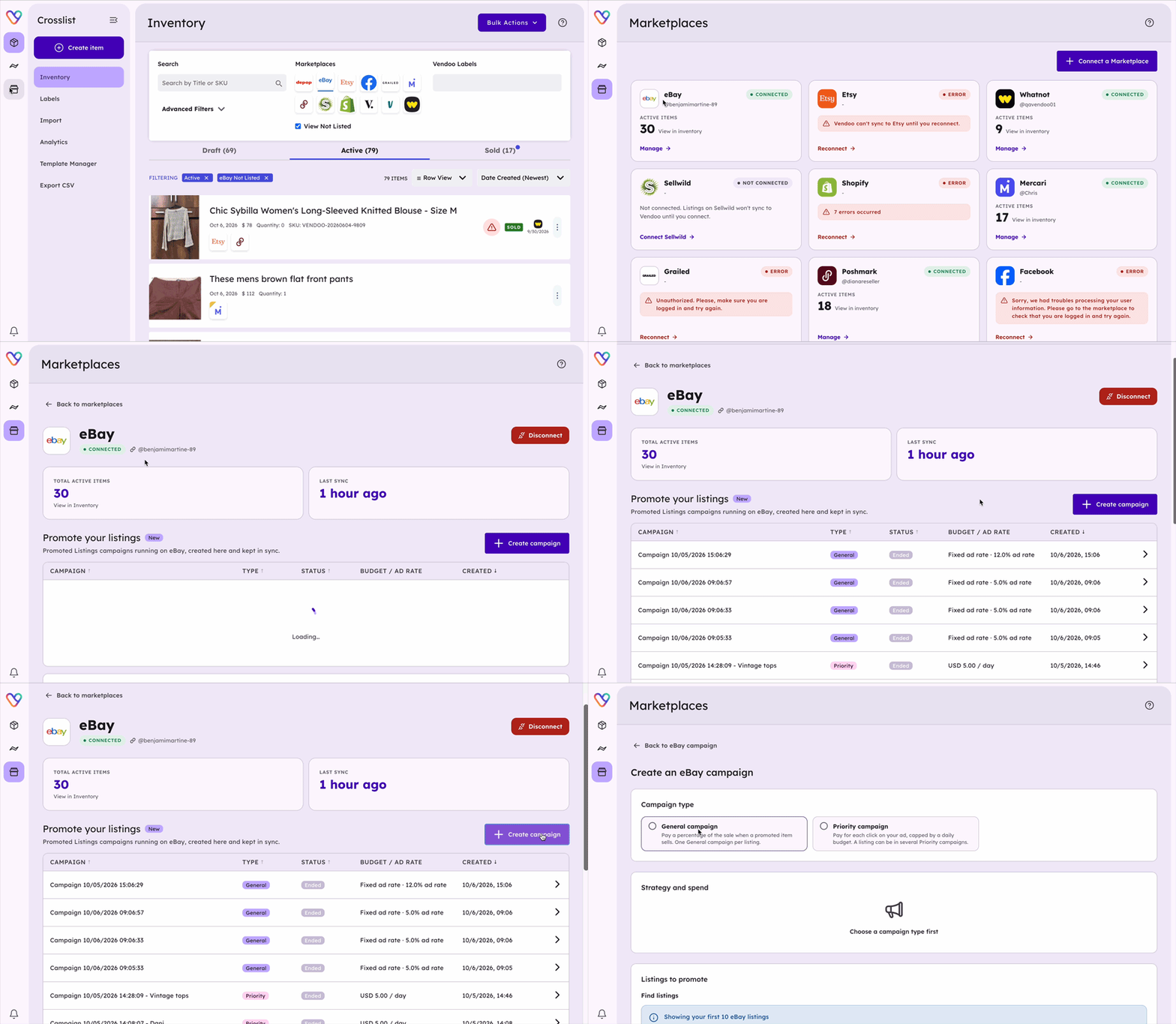
From there, you can:
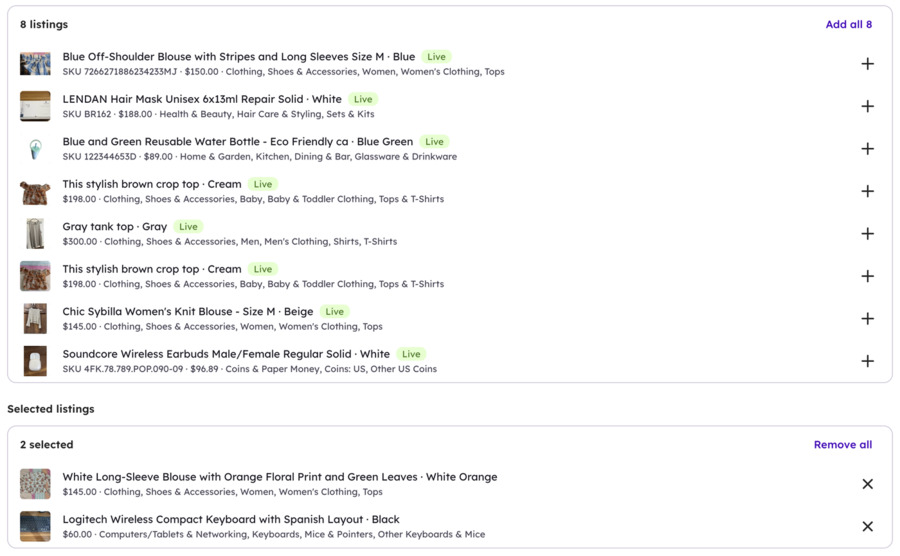
- Create campaigns and promote multiple listings: select the eBay items you want to promote, then create a General or Priority campaign.
- Use more advanced Priority targeting: create manually targeted Priority campaigns with dynamic or fixed bidding, use eBay-suggested keywords, add your own, and add negative keywords to avoid irrelevant searches.
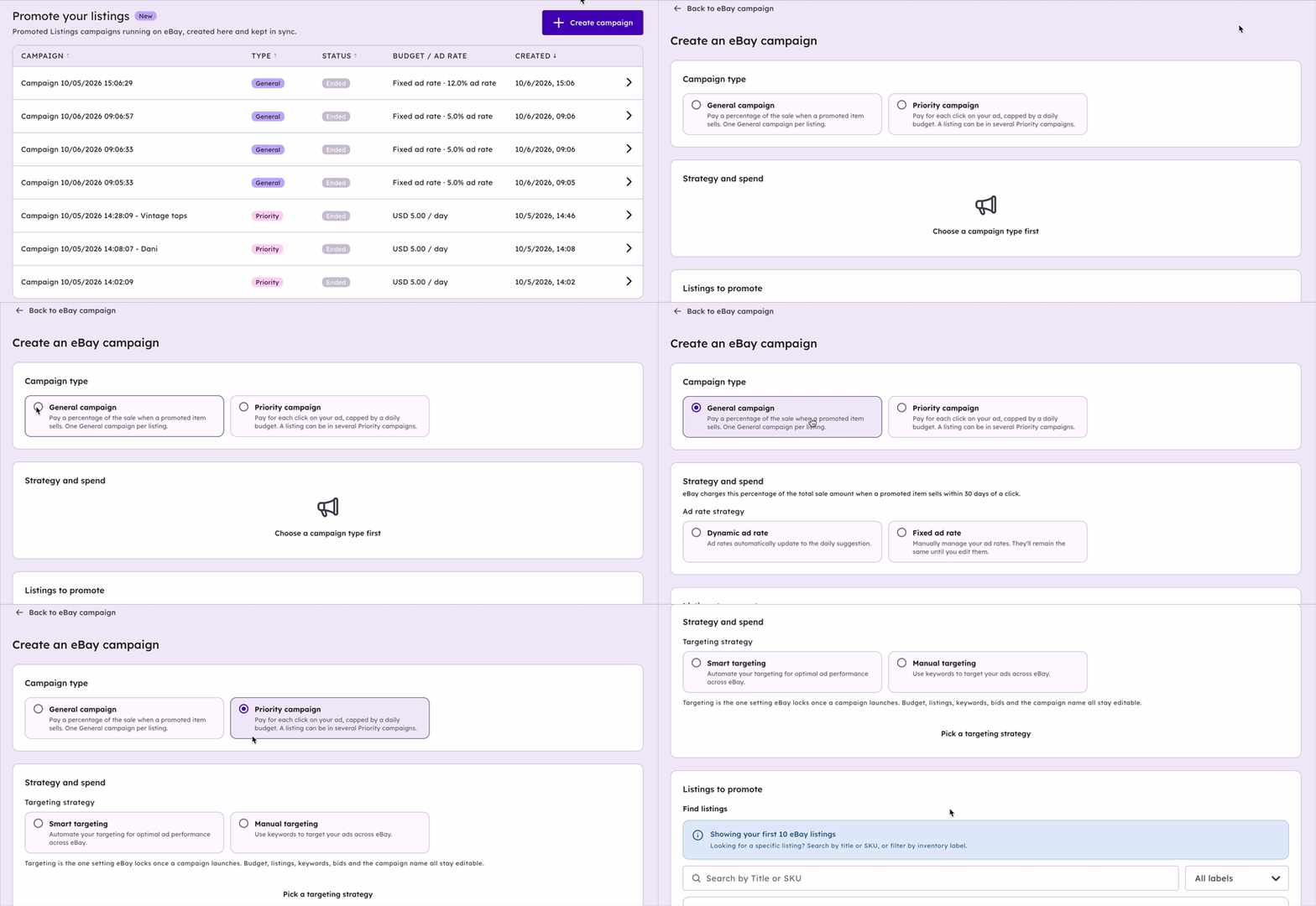
- Manage your campaigns: adjust supported campaign settings, pause or resume campaigns, and end them without going back to eBay.
- Track performance: generate performance reports for both General and Priority campaigns.
Good to know: use the listing form for a quick promotion, and Marketplace Connections when you want to go deeper. For a step-by-step walkthrough, see our help article on how to manage eBay Promoted Listings in Vendoo.

How to Choose Your Ad Rate
There's no magic number, but there is a sane process.
- Start from your margin, not eBay's suggestion. eBay's suggested ad rate optimizes for visibility, not your profit. Know your item cost, fees, and shipping first, then decide what percentage you can give up.
- Price the placement, not the pride. Higher ad rates generally win better placement, but a mid-range rate on a well-optimized listing often outperforms a high rate on a weak one.
- Promote what has demand. Promotion amplifies interest; it doesn't create it. Your best candidates are items with proven sell-through, so check how to research sold items on eBay to find yours.
- Adjust seasonally. Raise rates when your category heats up (Q4 for toys and electronics, back-to-school for apparel), and pull back when demand cools.
- Review every couple of weeks. Check your attributed sales and ad fees. If an item sells consistently without promotion, remove it from the campaign and spend that visibility elsewhere.
Are eBay Promoted Listings Worth It?
For most resellers, yes, when used selectively. The cost-per-sale structure of General campaigns means poorly performing promotions cost you nothing until an item actually sells, which makes them one of the lowest-risk advertising formats anywhere in e-commerce.
The sellers who regret Promoted Listings usually made one of three mistakes: they promoted everything indiscriminately, they set ad rates their margins couldn't support, or they used Priority campaigns on unproven items and paid for clicks that never converted.
The sellers who win with them promote strategically: fresh listings that need initial traction, proven sellers in competitive searches, and seasonal items during their peak window.
We'll publish a deeper dive on this question soon, with real reseller data.
Final Thoughts
eBay Promoted Listings are no longer optional knowledge for serious resellers. With the 2026 placement changes, sponsored slots occupy the most valuable real estate in eBay search, and your competitors are bidding for it. The good news: the system rewards sellers who promote thoughtfully, not just those who spend the most.
Start with General campaigns on items with proven demand, set ad rates your margins can carry, review your results, and adjust. And now that you can promote a single item from its eBay listing form, or create, manage, and track full campaigns from Marketplace Connections in Vendoo, promotion can finally live in the same workflow as your listing.
More visibility. More buyers. One less tab.
eBay Promoted Listings FAQs
How do eBay Promoted Listings work?
You add a listing to a campaign and eBay shows it in sponsored placements across search results and product pages. With General campaigns you pay a percentage of the sale price only when the item sells within 30 days of a click on the ad. With Priority campaigns you pay per click against a daily budget.
Does promoting a listing on eBay cost money?
Only on results, if you use General campaigns: the fee is a percentage of the sale price, charged when the promoted item sells within the 30-day attribution window. If it doesn't sell, you pay nothing. Priority campaigns are different, because you pay for every valid click, whether or not it produces a sale.
How much does eBay charge to promote a listing?
You set the cost yourself. For General campaigns, it's your chosen ad rate, a percentage of the item's total sale amount. For Priority campaigns, it's your per-click bids against a daily budget with a $3/day minimum. Ad fees are charged in addition to eBay's regular final value fees.
What is "Ad fee – General" on my eBay invoice?
It's the Promoted Listings fee from a General (cost-per-sale) campaign: your ad rate applied to an item that sold within 30 days of a click on its ad. If the amount looks off, check the ad rate set on that listing's campaign.
What does promoting your listing on eBay do?
It places your listing in sponsored positions, higher in search results and in additional placements across eBay, so more buyers see it. Promotion increases visibility; your title, photos, and price still determine whether that visibility converts into a sale.
How do I take a promotion off an eBay listing?
You can remove a listing from a campaign at any time, either from eBay's advertising dashboard or, if you use Vendoo, right from the eBay listing form. In Vendoo, you can also pause or end an entire campaign from Marketplace Connections → eBay → Manage. Fees already incurred (attributed sales or clicks) still apply, but no new fees accrue after removal.
Does eBay refund promoted listing fees?
Generally no. Ad fees from attributed sales stand even if the buyer later returns the item or the sale is canceled, though eBay may credit fees in specific cases such as some canceled transactions. Check your ad fee details in Seller Hub and contact eBay for case-by-case questions.
Can I bulk edit promoted listings?
On eBay, bulk campaign management happens in the advertising dashboard in Seller Hub. In Vendoo, you can promote multiple listings at once by selecting them when you create a campaign from Marketplace Connections → eBay → Manage, where you can also adjust supported campaign settings and pause, resume, or end campaigns. To change promotion for a single listing, use its eBay listing form.
Can I promote my eBay listings with Vendoo?
Yes! Open any eBay listing in Vendoo to create campaigns, set your ad rate or daily budget, and add the listing to a General (cost per sale) or Priority (cost per click) campaign, with no need to switch over to eBay. For more control, go to Marketplace Connections → eBay → Manage to promote multiple listings, use manually targeted Priority campaigns with keywords and negative keywords, pause, resume, or end campaigns, and generate performance reports.