
uBuyFirst is an eBay deal finder that helps resellers discover newly listed items at competitive prices before other buyers find them. With instant alerts, advanced search filters, and one-click purchasing, uBuyFirst helps online resellers source profitable inventory faster. But is it worth paying for? Here's everything you need to know about uBuyFirst, including its features, pricing, limitations, and alternatives.
Main Takeaways
- uBuyFirst helps resellers find eBay deals faster by monitoring newly listed items and sending alerts when listings match their search criteria.
- Advanced filters help identify profitable inventory, including price, shipping costs, seller feedback, condition, and other listing details.
- uBuyFirst offers free and paid plans, including a 30-day free trial for resellers interested in testing its features.
- The software works best on Windows. Mac users have access to a more limited browser-based experience, and phone alerts require the Enterprise plan.
- uBuyFirst does not automatically purchase items. Resellers must review and confirm each transaction, and competition for desirable listings can be fierce.
- uBuyFirst handles buying, while Vendoo handles selling. Use uBuyFirst to source inventory and Vendoo to track costs, create listings, crosslist inventory, and manage sales across multiple marketplaces.
What Is uBuyFirst?
uBuyFirst is eBay buying software designed to help resellers find newly listed deals before other shoppers. Instead of repeatedly refreshing eBay searches, users can create customized searches that monitor listings and notify them when matching items become available.
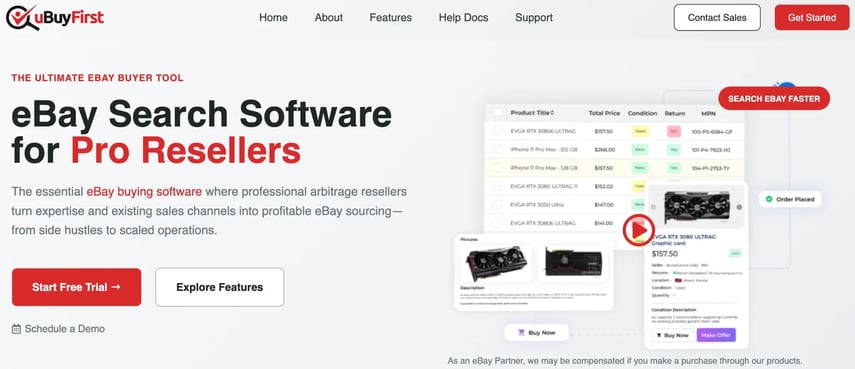
The software is particularly useful for resellers and flippers who source inventory on eBay. Many profitable resale opportunities come from underpriced Buy It Now listings, especially when sellers don't recognize an item’s resale value.
For example, a reseller specializing in vintage clothing might search for specific brands, styles, or keywords within a particular price range. When someone lists a desirable item below its typical resale value, uBuyFirst can notify the reseller so they can evaluate the opportunity immediately.
uBuyFirst describes itself as an “eBay Compatible Application” and supports major international eBay marketplaces.
Unlike traditional inventory management software, uBuyFirst focuses specifically on sourcing. It helps users discover potential purchases, but it doesn’t create resale listings, manage inventory, or handle orders after an item is purchased.
How uBuyFirst Works (and Its Key Features)
uBuyFirst works by monitoring customized eBay searches and alerting users when newly listed items match their criteria. Its biggest advantage is speed, giving resellers an opportunity to evaluate promising listings without constantly checking eBay manually.
For example, if you sell vintage Levi’s, you can set uBuyFirst to alert you when new pairs are listed.
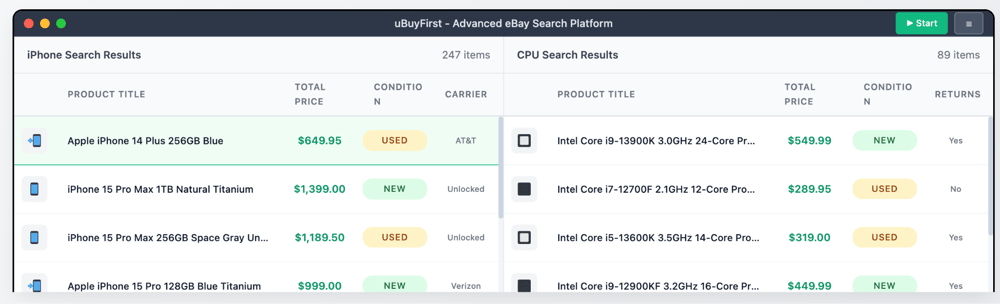
Getting started is straightforward:
- Create your searches. Enter keywords, brands, product categories, or specific items you want to source.
- Apply filters. Set your preferred price range, condition, seller requirements, and other criteria.
- Receive alerts. uBuyFirst monitors new listings and notifies you when matching items appear.
- Review the listing. Examine the photographs, description, shipping costs, and seller information before purchasing.
- Buy the item. Use the one-click Buy It Now feature to proceed with the purchase.
Importantly, uBuyFirst doesn't automatically purchase items. You remain responsible for reviewing listings and confirming transactions.
uBuyFirst Key Features
uBuyFirst offers several features designed to make sourcing inventory more efficient:
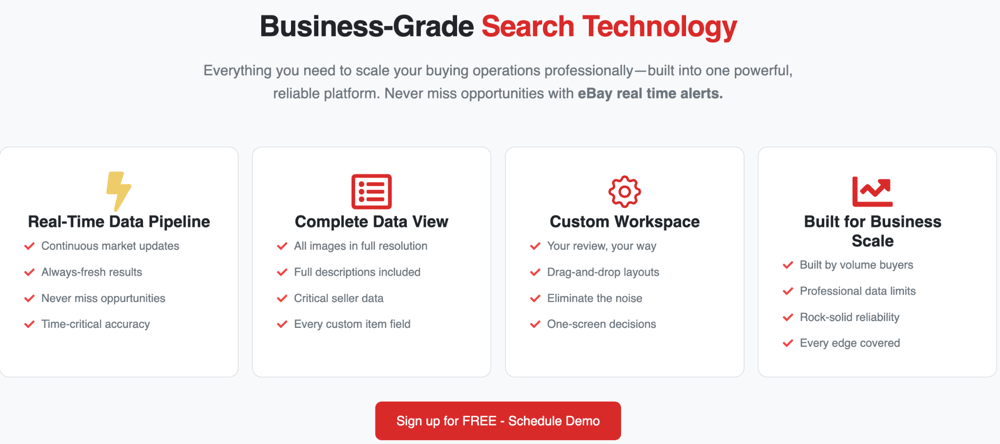
- Advanced Search Filters: Narrow results by price, seller feedback, return policies, item specifics, and other criteria to eliminate irrelevant listings.
- Total Price With Shipping: View the item’s price and shipping costs together to evaluate the actual purchase expense.
- Full Listing Details: Review photographs, descriptions, condition, seller information, and other relevant details in one interface.
- One-Click Buy It Now: Quickly proceed with purchasing eligible listings without repeatedly navigating through search results.
- Phone Alerts: Enterprise users can receive notifications through Telegram and Pushbullet, helping them monitor deals away from their computers.
- Google Sheets Integration: Sync sourcing information with Google Sheets for additional tracking and organization.
- International eBay Support: Search across major eBay sites to discover inventory opportunities beyond the United States.
These features are especially valuable when sourcing competitive categories such as collectibles, electronics, designer clothing, vintage items, and other products with established resale demand.
💡Tip: Finding a great deal is only half the job. Once your uBuyFirst purchase arrives, create your resale listing in Vendoo and record the purchase date and cost. Tracking your cost of goods helps you evaluate your profit margin when the item sells.

uBuyFirst Pricing (2026)
uBuyFirst offers three subscription plans in 2026, including a free option and paid subscriptions for resellers who need additional functionality.
uBuyFirst also offers a 30-day free trial, allowing users to explore the software before committing to a paid subscription. According to its homepage, the trial does not require a credit card.
One important limitation is that each license can run searches on only one computer at a time. Resellers working across multiple computers should consider this restriction before subscribing.
For most resellers, the decision comes down to sourcing volume. Someone purchasing a few items monthly might not benefit enough to justify a paid subscription. However, an active reseller who regularly sources profitable inventory on eBay may recover the subscription cost through additional purchases.
💡Tip: See uBuyFirst’s official pricing page for current plan details.
uBuyFirst Pros and Cons
uBuyFirst offers useful sourcing tools, but its platform limitations and competitive nature mean it won’t be the best choice for every reseller.
uBuyFirst Pros
- Finds newly listed eBay deals without constant manual searching.
- Offers customizable filters to narrow sourcing opportunities.
- Displays shipping costs alongside item prices.
- Supports major international eBay marketplaces.
- Provides a free plan and 30-day trial.
- Offers convenient purchasing tools and optional phone alerts.
uBuyFirst Cons
- Full desktop functionality is available only on Windows.
- Phone notifications require the Enterprise subscription.
- Paid plans add another monthly business expense.
- Users must manually review and confirm purchases.
- Competing buyers may purchase desirable items first.
- Doesn’t provide resale listing or inventory management tools.
The biggest consideration is that speed doesn’t guarantee profitability. Finding an item first is only valuable when the purchase price leaves enough room for resale profit.
Is uBuyFirst Worth It?
uBuyFirst can be worth it for active resellers who regularly source inventory on eBay, particularly those using Windows computers. Its alerts and filters can reduce the time spent searching and help identify opportunities that might otherwise disappear quickly.
For example, a reseller who purchases dozens of items monthly may benefit significantly from finding even a few additional underpriced listings.
However, uBuyFirst may not be necessary for casual buyers, occasional flippers, or resellers who primarily source at thrift stores, estate sales, and local marketplaces.
Mac users should also consider the limitations of uBuyFirst. While it offers a lighter browser-based experience, it doesn’t provide the same functionality as its Windows software.
For casual sourcing, eBay’s free saved searches are a practical starting point. You can save searches and receive email notifications when new matching listings become available.
Before purchasing inventory, remember that a low asking price doesn't necessarily mean an item is profitable.
💡Tip: Use Vendoo's free eBay Price Checker to research resale value and the eBay Fee Calculator to estimate marketplace fees and potential profit.
uBuyFirst vs. eBay Snipers
uBuyFirst and eBay snipers serve different purposes: uBuyFirst finds newly listed Buy It Now deals, while auction sniping tools place bids near the end of eBay auctions… very different.
An eBay sniper is a tool that submits a bid during the final seconds of an auction. The goal is to avoid early bidding competition and potentially win an item at a favorable price.
uBuyFirst focuses on identifying newly listed inventory, especially underpriced Buy It Now listings that can sell almost immediately.
For example, if someone lists a vintage designer handbag for $40 when comparable items regularly sell for $150, uBuyFirst can help a reseller discover that listing quickly.
An auction sniping tool would instead help the reseller compete for a handbag being sold through an auction.
Both tools can support an eBay sourcing strategy, but they address different buying opportunities.
uBuyFirst Alternatives
Several uBuyFirst alternatives offer different approaches to finding deals and purchasing inventory on eBay.
- eBay Saved Searches: Saving eBay searches for particular items is a free native eBay functionality. When you save a search, eBay sends email notifications about new listings matching saved search criteria. ⭐️
- Gixen: An auction sniping service that places bids near the end of eBay auctions.
- BayGenie: An eBay buying tool focused on auction sniping and bidding assistance.
- UnderMRKT: A deal-finding alternative worth exploring for sourcing opportunities.
- LazyPerks: Another alternative to research when comparing deal-discovery tools.
These alternatives aren’t necessarily direct replacements for uBuyFirst. Some specialize in auction bidding rather than detecting newly listed Buy It Now opportunities.
From Buy to Sold: Managing Your uBuyFirst Finds With Vendoo
uBuyFirst helps resellers discover inventory, while Vendoo helps turn those purchases into organized, profitable resale listings. 💰
The tools serve different purposes and don’t integrate directly, but they can complement each other in a reseller’s workflow.
Track What You Paid for Every Find
Tracking your purchase price is essential for understanding profitability. An item purchased for $20 and sold for $60 doesn’t necessarily generate $40 in profit once marketplace fees and other expenses are considered.
When creating a listing in Vendoo, you can record the purchase date and cost of goods for each item.
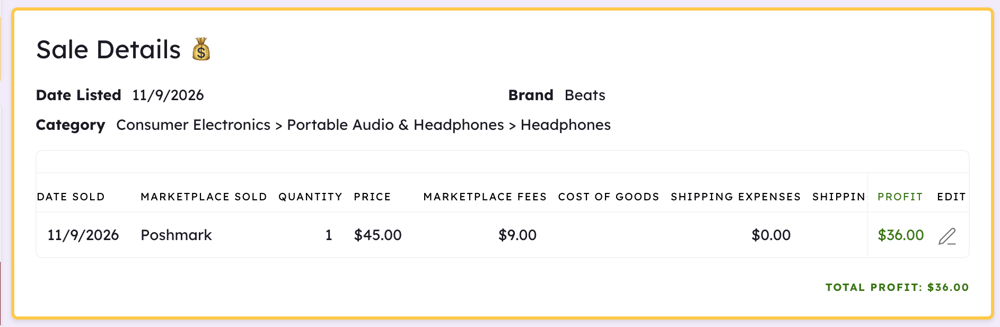
These fields help you maintain accurate inventory records and evaluate how much you actually make on individual flips.
For resellers purchasing inventory frequently through uBuyFirst, recording costs immediately can prevent confusion later, especially when sourcing similar items or multiple products from the same brand.
Crosslist Your Finds to 10+ Marketplaces
Vendoo allows resellers to create a listing once and crosslist it to 10+ marketplaces, including eBay, Poshmark, Mercari, Depop, Whatnot, Etsy, Facebook Marketplace, and more.
Instead of manually recreating product descriptions, uploading photographs, and entering item details on each platform, you can manage the listing process through one dashboard.
Vendoo also offers listing templates to streamline repetitive listing tasks.
For resellers managing larger inventories, the Growth plan includes additional tools such as AI Listing Enhancement and bulk actions, helping speed up listing creation and inventory maintenance.
Never Sell the Same Item Twice
Crosslisting increases exposure, but selling the same item on multiple marketplaces requires careful inventory management.
Vendoo offers Sale Detection and Auto Delist for supported marketplaces, including eBay, Poshmark, Mercari, Depop, Whatnot, and Etsy.
When an eligible sale is detected, Vendoo can automatically remove the corresponding listings from other supported marketplaces, reducing the risk of selling an item that is no longer available.
Vendoo also offers Delist and Relist tools to help resellers refresh older inventory and maintain active listings.
For additional flexibility, Vendoo has iOS and Android apps, allowing sellers to work on their resale businesses away from their computers.
Vendoo plans start at $12.49 per month with an annual plan and there’s a 14-day free trial available.
The Bottom Line: Is uBuyFirst Worth It for Resellers?
uBuyFirst is a valuable sourcing tool for resellers who regularly purchase inventory on eBay and want to find profitable deals faster. Its advanced filters, instant alerts, and purchasing features can save time, although its Windows limitations and subscription costs may not make sense for everyone.
Ultimately, finding inventory is only half the business. Use uBuyFirst to source profitable inventory and Vendoo to list, crosslist, and manage your items until they sell.
uBuyFirst FAQs
Is uBuyFirst free?
Yes, uBuyFirst offers a free Basics plan, along with paid Elite and Enterprise subscriptions. Paid plans provide additional sourcing capabilities, including advanced notification options.
Does uBuyFirst work on Mac?
uBuyFirst’s full desktop software is designed for Windows. Mac users can access a lighter browser-based version, but its functionality is limited compared to the Windows software.
Is uBuyFirst safe for my eBay account?
uBuyFirst identifies itself as an eBay Compatible Application and states that it doesn’t store users’ eBay login credentials. However, no third-party software is entirely risk-free. Consult eBay’s current policies before using third-party buying tools.
Does uBuyFirst buy items automatically?
No, uBuyFirst does not automatically purchase items. The software identifies matching listings and provides tools to help users act quickly, but buyers must review and confirm purchases themselves. This allows resellers to evaluate an item’s condition, shipping costs, seller information, and potential resale value before spending money.
Can uBuyFirst list items for resale?
No, uBuyFirst is designed for sourcing inventory on eBay, not creating or managing resale listings. After purchasing an item, resellers need a separate listing solution. Reseller tools like Vendoo help create listings, track inventory costs, publish products across multiple marketplaces, and manage sales.